
Download OmniGraffle – Professional Diagramming Tool for Mac, Windows & iOS
Overview: Why OmniGraffle Stands Out in the Diagramming Landscape
OmniGraffle has earned a reputation as the go‑to diagramming application for designers, architects, project managers, and anyone who needs to turn abstract ideas into clear visual representations. Built originally for macOS, the software now extends its reach to iOS devices, offering a seamless experience across desktop and mobile platforms. The core philosophy behind OmniGraffle is simplicity without sacrificing depth: a clean, drag‑and‑drop canvas lets you place shapes, lines, and text in seconds, while a rich set of customization tools lets power users fine‑tune every element.
Whether you are mapping out a complex network topology, sketching a user‑experience flow, or drafting a hierarchical org chart, OmniGraffle provides the precision of a vector editor combined with the ease of a dedicated diagramming suite. Its Bézier curve editor lets you create unique shapes that go beyond the standard library, and its automatic alignment guides ensure that even the most intricate diagrams stay perfectly organized. The application also supports layers, stencils, and reusable templates, making it a versatile choice for both one‑off projects and ongoing documentation workflows.
In addition, OmniGraffle’s export options—including PDF, SVG, PNG, and Visio—ensure that your diagrams can be shared with stakeholders who may not have the software installed, preserving fidelity across platforms. Overall, OmniGraffle delivers a balanced blend of user‑friendly design and professional‑grade capabilities, positioning it as a valuable asset for anyone who needs to visualize concepts quickly and accurately.
Features That Empower Every Diagramming Need
- Extensive Shape Library: Over 300 pre‑built shapes, icons, and stencils covering flowcharts, UML, wireframes, and more.
- Bezier Curve Editing: Create custom vector shapes with precision control points and smooth curves.
- Smart Guides & Auto‑Layout: Real‑time alignment assistance and automatic tree or radial layout algorithms.
- Layer Management: Organize complex diagrams on multiple layers, toggle visibility, and lock elements.
- Reusable Templates & Stencils: Save frequently used diagram components for instant reuse across projects.
- Cross‑Platform Sync: iCloud and Dropbox integration keep your files synchronized between macOS and iOS devices.
- Export & Import Flexibility: Export to PDF, SVG, PNG, JPEG, Visio (VSDX), and import from Visio, SVG, and GraphML.
- Advanced Styling: Gradient fills, shadows, line caps, and customizable text styles for a polished look.
- Interactive Prototyping: Link diagram objects to create clickable mock‑ups for presentations.
- Keyboard Shortcuts & AppleScript Support: Accelerate workflow with hotkeys and automate repetitive tasks.
Installation, Usage & Compatibility – Getting Started Quickly
Downloading OmniGraffle is straightforward. Visit the official website or the Mac App Store, click the “Download” button, and the installer will appear as a .dmg file for macOS or a .ipa for iOS. After opening the .dmg, drag the OmniGraffle icon into your Applications folder. For iOS devices, simply tap “Get” in the App Store and follow the on‑screen prompts. The installation process typically takes less than five minutes on a modern computer.
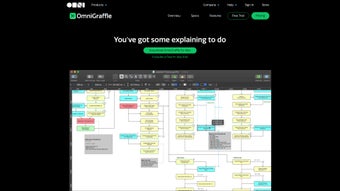
Once installed, launch OmniGraffle and you’ll be greeted by a clean welcome screen offering quick‑start templates such as “Blank Canvas,” “Flowchart,” “Org Chart,” and “Wireframe.” Choose a template that matches your project, and the canvas loads with relevant shapes already organized. Drag any shape from the left‑hand stencil panel onto the canvas, then use the Inspector on the right to adjust size, color, line style, and text. To connect shapes, select the line tool, click the source shape, and then the destination shape; OmniGraffle automatically snaps lines to connection points, ensuring a tidy layout.
Compatibility: OmniGraffle is natively built for macOS 11 (Big Sur) and later, with a fully featured iOS version for iPhone and iPad running iOS 14+. While there is no official Windows version, users can run OmniGraffle on Windows via a macOS virtual machine or use the web‑based viewer to share diagrams with Windows colleagues.
The first‑time user experience is further enhanced by an interactive tutorial that walks you through creating a simple flowchart. After the tutorial, you can explore advanced features such as the “Auto‑Layout” engine, which reorganizes complex diagrams with a single click, or the “Canvas Styles” that let you apply consistent branding across all your work. OmniGraffle also supports keyboard shortcuts (⌘N for new document, ⌘S to save, ⌥⌘C to copy style) and AppleScript, enabling power users to automate repetitive diagram‑generation tasks.
Deep Dive: Pros, Cons, FAQs & Expert Review
Pros
- Intuitive drag‑and‑drop interface reduces learning curve for beginners.
- Professional‑grade vector editing tools give unparalleled design precision.
- Robust library of shapes and stencils covers virtually every industry use case.
- Seamless iOS integration allows work on the go without losing functionality.
- High‑quality export options keep diagrams crisp across all platforms.
Cons
- Native macOS focus means no dedicated Windows client, limiting cross‑platform adoption.
- Pricing model is subscription‑heavy for the Pro tier, which may deter occasional users.
- Advanced features such as scripting require some technical knowledge.
- Large files can become sluggish on older hardware without sufficient RAM.
- Limited collaboration tools compared to cloud‑first competitors like Lucidchart.
Frequently Asked Questions
Is there a free version of OmniGraffle?
OmniGraffle offers a 14‑day free trial with full feature access. After the trial, you can choose between the Standard or Pro subscription plans; there is no permanently free tier.
Can I import Visio (VSDX) files into OmniGraffle?
Yes. OmniGraffle Pro includes a built‑in Visio import engine that converts VSDX files to editable OmniGraffle objects, preserving layers and styles where possible.
How does OmniGraffle handle team collaboration?
Collaboration is primarily achieved through file sharing services like iCloud, Dropbox, or Git. While real‑time co‑editing isn’t native, you can lock layers or objects to prevent overwrites.
Is OmniGraffle suitable for creating wireframes?
Absolutely. The app includes a dedicated UI kit with common interface elements, and its vector editing tools let you quickly iterate on interactive prototypes.
What export formats are available for sharing diagrams?
OmniGraffle can export to PDF, PNG, JPEG, SVG, EPS, and Visio (VSDX). You can also generate web‑ready HTML pages that embed interactive diagrams.
Conclusion: Should You Download OmniGraffle Today?
OmniGraffle remains one of the most polished and powerful diagramming tools available for macOS and iOS. Its blend of an approachable interface, deep vector‑editing capabilities, and a rich ecosystem of shapes and templates makes it a solid choice for both casual users and seasoned professionals. While the lack of a native Windows client and a subscription‑focused pricing model may give some buyers pause, the overall value—especially for designers who demand precision and flexibility—justifies the investment. If you regularly create flowcharts, wireframes, network diagrams, or any visual representation that benefits from meticulous styling, OmniGraffle will likely become an indispensable part of your workflow.
Ready to transform your ideas into crisp, shareable diagrams? Download OmniGraffle now and start your free trial. Experience the seamless drag‑and‑drop canvas, explore the extensive shape library, and see how the app’s smart layout engine can save you hours of manual tweaking. Your next great diagram is just a click away.







